

Why Do Screen Prints Crack? 6 Causes & Fixes
Table of Contents
- Why Do Screen Prints Crack? The Short Answer
- The #1 Culprit: Under-Curing and Heat Press Issues
- Ink Elasticity and Why It Matters
- How to Wash Graphic Tees Properly (Without Ruining the Print)
- How to Fix Cracked Screen Print Designs at Home
- Garment Fabric and Ink Compatibility: The Hidden Variable
- Is It Cracking or Fading? A Visual Identification Guide
- Stop Screen Prints From Cracking: Prevention Checklist
- Frequently Asked Questions
Last Updated: September 7, 2026
Why Do Screen Prints Crack? The Short Answer
Screen prints crack because the ink film loses its flexibility and can no longer bend with the fabric underneath it. When the cured ink becomes brittle or was never fully cured, everyday movement and washing create tiny fractures that spread into visible cracks.
The good news? Most cracking is entirely preventable.
Printwear Magazine's guide to screen printing quality control emphasizes that print longevity starts with understanding the relationship between ink and fabric. Let's get into what actually goes wrong.
The #1 Culprit: Under-Curing and Heat Press Issues
Under-curing is the most common reason screen prints crack, and it happens when the ink doesn't reach the temperature needed to fully polymerize. Plastisol ink requires a specific curing temperature to bond properly with the garment fibers. When the ink film isn't heated enough, it stays soft and tacky on the surface, then hardens into a brittle layer that cracks after just a few washes.
Curing Temperature vs. Time
Curing is a balancing act between heat and dwell time. Most plastisol inks need to reach roughly 320°F (160°C) at the ink film itself, not just the air in the dryer. A common mistake is relying on the dryer's display reading instead of verifying the actual temperature on the garment surface.
When the Heat Press Goes Wrong
Heat pressing a print for too long or at too high a temperature causes thermal degradation that makes the film hard and brittle before it ever hits the wash. Many DIY printers using a heat press struggle with this because the heat comes from one side only. The result is a print that looks perfect on day one but shatters under fabric tension within weeks.
Ink Elasticity and Why It Matters
Ink elasticity is the ability of the cured ink film to stretch and recover with the fabric, and it's the single biggest factor in whether a print survives repeated wear. When you pull a graphic tee over your head, the cotton stretches. A print with good elasticity moves right along with it. A brittle, low-elasticity print resists that movement, and the stress creates micro-cracks that grow over time.
Heavier ink deposits look vibrant and opaque, but they're also more prone to cracking because a thicker film has less flexibility.
The Chemistry Behind the Crack: Plastisol vs. Water-Based vs. Discharge
The real differentiator is the chemical structure of the ink itself, which determines whether a print will crack after ten washes or two hundred.
Plastisol ink is a suspension of PVC resin particles in a plasticizer. Heat melts the resin into a continuous plastic film that sits on top of the fabric, giving plastisol its signature durability and color opacity. But the same chemistry creates the weakness: a thick PVC film is inherently less flexible than the cotton fibers underneath it. Over time, the plasticizer can migrate out of the film, especially with repeated washing in hot water, leaving the ink more brittle.
Water-based ink works differently. The pigment is suspended in a water-and-resin solution that soaks into the garment fibers. After the water evaporates and the resin cures, the pigment is locked inside the fabric structure rather than sitting on top of it, so there is no separate film to crack. The trade-off: water-based inks are harder to cure consistently and produce less vibrant results on dark garments unless you use an underbase.
Discharge ink takes the water-based approach one step further. It contains a reducing agent that strips the dye out of the garment's cotton fibers, then deposits pigment in its place, creating a print that is literally part of the fabric. Discharge prints have the highest crack resistance of the three, which is why they are the go-to choice for vintage-style soft-hand prints on dark tees. The catch: discharge only works on 100% cotton garments, and the reducing agents have a limited shelf life.
Why Thicker Prints Crack Faster: The Physics of Film Stress
A thicker ink film cracks faster than a thin one because bending stress increases with thickness. When a fabric bends, the outer surface stretches more than the inner surface, and a thick film has more material on that outer surface. Professional printers compensate by using higher mesh counts (156 to 230 for standard plastisol) to deposit thinner films.
The Elasticity Test You Can Do at Home
You do not need a lab to assess whether a print has good elasticity. Stretch the printed area gently between both hands. A healthy print should flex with the fabric and return to its original shape without visible stress marks.
| Ink Type | Flexibility | Crack Resistance | Best For |
|---|---|---|---|
| Plastisol | Moderate | Good when cured properly | Vibrant prints on dark tees |
| Water-based | High | Excellent | Soft, vintage-feel prints |
| Discharge | High | Excellent | Light prints on dark cotton |
How to Wash Graphic Tees Properly (Without Ruining the Print)
The way you wash and dry a graphic tee has as much impact on print longevity as the printing process itself. Even a perfectly cured print will crack prematurely if you abuse it in the laundry.
Washing and Drying Rules That Protect the Ink Film
Turn the shirt inside out before washing to protect the print from friction. Use cold water, which prevents the ink from softening and the fabric from shrinking, and skip harsh detergents.
Air drying is always the safest option. If you must use a dryer, keep it on the lowest heat setting possible. High heat accelerates thermal degradation and makes the ink film brittle.
How to Fix Cracked Screen Print Designs at Home
Minor cracking can sometimes be rescued with a careful re-cure, but severe cracks usually mean the print is beyond saving. Here's how to assess and fix a cracked screen print:
- Evaluate the damage. Light surface crazing might respond to a heat press re-cure. Deep cracks that expose the fabric underneath cannot be repaired.
- Re-cure with a heat press. Set the press to the ink's recommended curing temperature and apply firm pressure for the required dwell time. This can fuse minor cracks back together.
- Use a fabric paint touch-up. For small cracked areas, a matching fabric paint applied with a fine brush can mask the damage.
- Consider a print repair film. Heat-activated repair films can re-bond lifting edges of the ink film to the fabric.
- Accept the loss. If the cracking is widespread, the most practical fix is replacing the shirt or having a new print applied.
Garment Fabric and Ink Compatibility: The Hidden Variable
The fabric you print on is just as important as the ink and the cure, and not all garments are created equal. Screen printing works best on natural fibers like cotton, where the ink can form a strong mechanical bond. Synthetic fabrics like polyester and blends don't absorb ink the same way and are more prone to heat damage during curing. The substrate choice affects everything from ink viscosity to mesh count selection.
Prints on low-quality, loosely woven fabrics tend to crack faster because the fabric itself stretches and shifts more during wear. A tight, high-quality cotton weave provides a stable base for the ink film. This is why premium blank garments cost more: they actually hold prints longer.
The DIY Hobbyist Problem: Your Heat Press Is Not a Dryer
Most articles on screen print cracking are written for professional shops with conveyor dryers. If you are a hobbyist, your equipment changes the failure modes entirely. A heat press applies heat from one side only, while a conveyor dryer surrounds the garment with heat from both sides.
This is why DIY prints crack so often: the bottom of the ink film never fully polymerizes, so the bond to the fabric is weak from day one.
How to Work Around One-Sided Heat
If you are curing with a heat press, the standard workaround is to flash the print, then press again from the back of the shirt. Flipping the garment pushes heat through the fabric into the bottom of the ink film.
Another common DIY mistake is pressing on a hard platen. A soft silicone pad or a layer of Teflon-coated fiberglass allows the fabric to compress slightly under pressure, improving heat transfer into the fibers.
Fabric-Specific Failure Modes for Home Printers
100% cotton is the most forgiving substrate for a heat press cure. The fibers tolerate high temperatures well, and the mechanical bond between ink and cotton is strong.
50/50 cotton-polyester blends are where DIY prints fail most often. Polyester has a lower melting point than cotton, so the heat needed to cure plastisol ink can easily degrade the polyester fibers. If you are printing on blends, reduce the press temperature by 15 to 20 degrees and increase the dwell time to compensate.
100% polyester requires a completely different approach. Standard plastisol will not bond well, and the heat required for curing can melt the fabric. Most practitioners recommend low-bleed plastisol formulations or a water-based ink designed for synthetics.
The Mesh Count and Fabric Weight Connection
Fabric weight determines how much ink you need to deposit for a solid print. A heavy 6-ounce cotton tee has a looser weave that absorbs more ink, so a lower mesh count (110 to 156) is standard. A lightweight 4-ounce tee has a tighter weave that holds less ink, so a higher mesh count (200 to 230) is necessary to avoid a thick, crack-prone deposit.
A Quick Fabric Checklist Before You Print
- Check the garment label. 100% cotton is the safest choice for plastisol.
- Feel the weave. A tight, smooth surface holds prints better than a loose, textured one.
- Test with a scrap. Press a small ink patch and wash it before printing the full design.
- Adjust mesh count to fabric weight. Lighter fabric needs a finer mesh.
- Lower the temperature on blends. Protect the polyester content from heat damage.
Is It Cracking or Fading? A Visual Identification Guide
Cracking and fading are different failure modes with different causes and fixes. Cracking appears as lines, spiderwebs, or jagged breaks in the ink film where the fabric shows through. Fading looks like a gradual loss of color intensity, often with a chalky or washed-out appearance across the whole design.
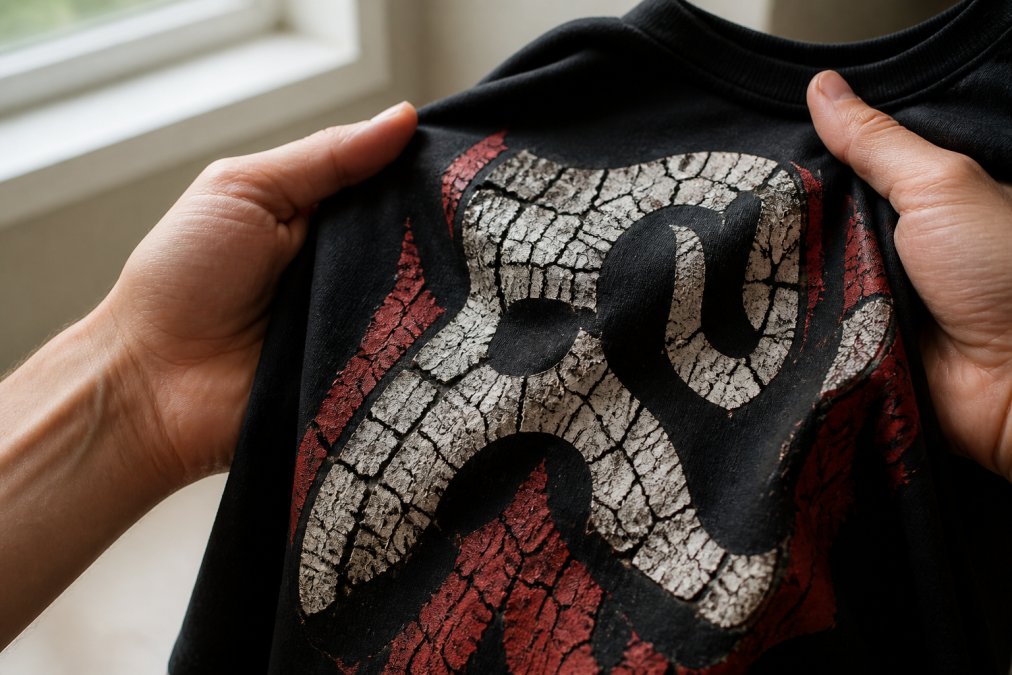
Run your fingernail across the print. If you feel ridges or raised edges, that's cracking. If the surface feels smooth but the color looks dull, that's fading.
Stop Screen Prints From Cracking: Prevention Checklist
Prevention beats repair every time. Whether you're printing your own designs or buying from a shop, this checklist covers the essentials:
- Verify the cure. If you're printing, always test with a wash test before selling or wearing.
- Wash inside out in cold water with gentle detergent.
- Air dry or tumble dry on low. High heat is the enemy of ink film.
- Skip fabric softeners. They weaken the ink-to-fabric bond.
- Choose quality garments. Tight-weave cotton holds prints better than loose blends.
- Buy from printers who care. Look for shops that discuss print durability and garment quality.
At Hot Takes Designs, every piece is custom-printed, cut, and sewn to order using ultra-soft fabrics and vibrant, long-lasting prints.
Cracked prints are frustrating, but they're rarely a mystery. Most screen prints crack because of under-curing, poor ink elasticity, harsh laundry habits, or an incompatible fabric and ink pairing. Understanding these causes puts the power back in your hands, whether you're troubleshooting your own DIY prints or shopping for tees that will actually last. Hot Takes Designs uses premium fabrics and rigorous production standards so your fandom gear stays vibrant through countless washes. American Apparel's guide to garment care and print longevity offers additional tips for keeping your favorites in rotation. Screen Printing Magazine's technical resources on ink curing is a solid reference for DIY printers. View all our designs and find your next main character outfit.
Frequently Asked Questions
How to stop screen printing from cracking?
Start with garment care: turn the shirt inside out and wash in cold water. Skip the dryer and hang it to dry instead. Prevention also happens at production. Prints crack when the ink film is too thick or under-cured. A proper curing temperature and a thin ink deposit create a flexible bond that survives wear and washing.
Is it normal for screen prints to crack after washing?
Some minor surface crazing is normal over time, but significant cracking after just a few washes points to a production problem. Under-curing is the most common cause. The ink film never fully polymerized, so it stays brittle and breaks when the fabric stretches. A quality print should last for years with proper care.
Does heat cause screen prints to crack?
Heat is part of the problem when it is applied wrong. A dryer on high heat breaks down the ink's elasticity over time. The opposite issue happens during production: the heat press or conveyor dryer never reached the curing temperature required for the ink to bond properly. Both scenarios leave the print vulnerable to cracking.
Why are my screen prints peeling off?
Peeling is different from cracking. Cracks appear as fine lines in the ink film. Peeling means the print is separating from the fabric. This usually comes from a low-quality adhesive base layer or curing at too low a temperature. The ink never formed a strong bond with the shirt fibers.