

How to Remove Stains From Graphic Tees Without Damaging Print
Last Updated: October 22, 2026
Quick Summary
To remove stains from graphic tees without damaging print, act within minutes: blot, never rub, treat with a mild clear detergent in cold water, and keep heat away from the design. Graphic tees fail because of heat and friction, not the stain itself.
- Patch test any cleaner on the inside hem and wait 10 minutes before applying it.
- Rinse food stains from the back of the fabric so detergent stays off the ink layer.
- Wash graphic tees inside out on a cold, gentle cycle with half the normal detergent.
- Air-dry printed shirts, since high heat is the top cause of cracked prints.
- Avoid acetone, paint thinner, and rubbing alcohol near DTF and HTV prints.
Table of Contents
- How to Remove Stains From Graphic Tees Without Damaging Print: The Quick Answer
- What You'll Need Before You Start
- Step 1: How to Remove Oil Stains From a Printed Shirt
- Step 2: How to Remove Food Stains From a Graphic Tee
- Step 3: The Best Stain Remover for Printed Shirts (and What to Avoid)
- Step 4: How to Wash Graphic Tees Without Fading
- Step 5: Drying and Post-Treatment Checks
- Common Mistakes That Damage Prints
- Frequently Asked Questions
How to Remove Stains From Graphic Tees Without Damaging Print: The Quick Answer
The fastest way to remove stains from graphic tees without damaging print is to act within minutes: blot, never rub, treat with a mild clear detergent in cold water, and keep heat away from the design. Graphic tees fail because of heat and friction, not the stain itself.

What You'll Need Before You Start
Gather supplies before you touch the stain, a rushed hunt lets it set.
Your kit:
- Clear, mild liquid detergent (no dyes, no bleach)
- Cold water
- Clean white cloths or paper towels
Skip anything with chlorine bleach, "oxy" boosters, or fabric softener. Those attack print adhesives and dye.
Always patch test on the inside hem first, wait a few minutes, and check for color change.
Step 1: How to Remove Oil Stains From a Printed Shirt
The best way to remove oil stains from a printed shirt is to absorb first, then treat with clear detergent, then rinse cold. Oil needs a surfactant, not heat.
- Blot the excess. Press a clean cloth onto the stain. Do not rub.
- Sprinkle baking soda. Let it sit 10-15 minutes to pull oil out of the cotton.
- Apply clear liquid detergent. A small drop directly on the stain.
- Work it in gently. Use your fingertip or a soft brush. Never scrub the printed design.
- Wait 10 minutes. Let the detergent break down the oil.
- Rinse with cold water. Rinse from the back of the fabric so the stain pushes out, not through the print.
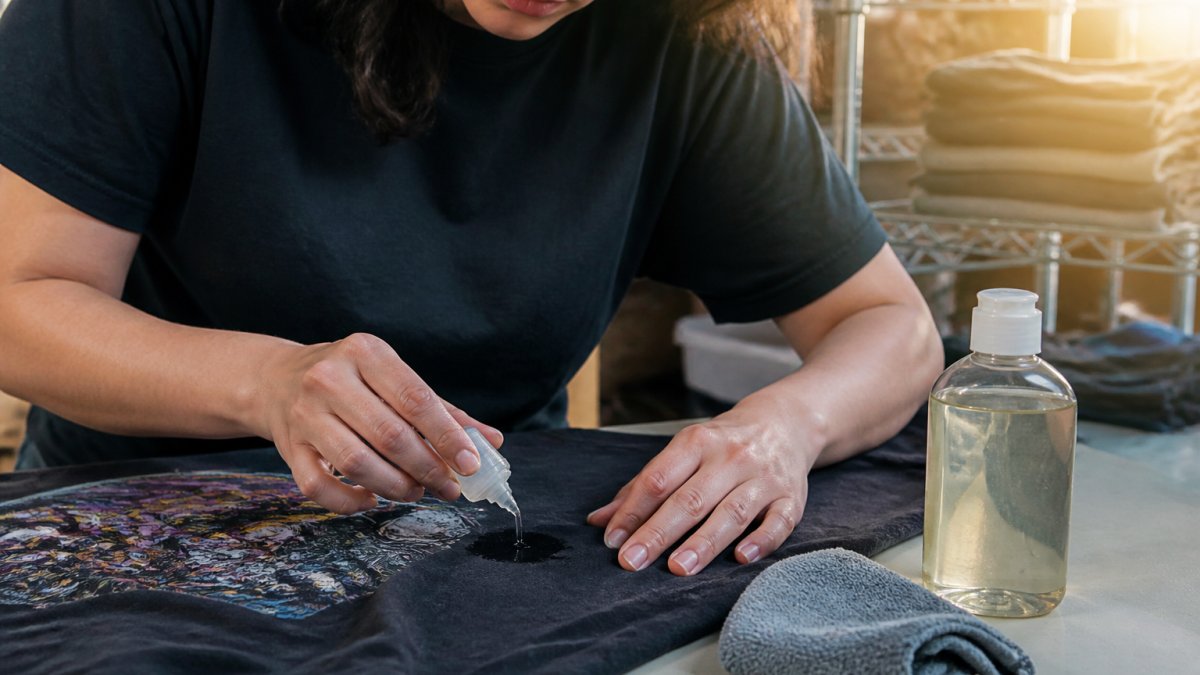
If the oil mark lingers, repeat once. A common mistake is reaching for hot water. Hot water sets oil and softens print adhesive at the same time.
Step 2: How to Remove Food Stains From a Graphic Tee
Food stains on a graphic tee fall into three chemical families, each failing for a different reason. Treat them all the same and you'll either set the stain or lift the print.
| Stain Type | First Move | Follow-Up | Avoid |
|---|---|---|---|
| Coffee, tea, red wine | Blot, then cold rinse from the back | Diluted white vinegar soak, 15 min | Hot water, which sets tannins |
| Grease, oil-based sauce | Baking soda absorb, 10-15 min | Clear detergent, 10 min | Rubbing, which spreads the oil |
| Grass, mud | Cold rinse from the back | Detergent, soft brush | Chlorine bleach |
| Sweat, pit stain | Baking soda paste, 20 min | Cold wash, air-dry | High heat, fabric softener |
| Ink, marker | Blot, do not spread | Detergent dab, repeat | Acetone near the print |
| Berry, beet, dye-based food | Cold rinse immediately | Diluted vinegar, then detergent | Hot water, which bonds the pigment |
Coffee, tea, and red wine are tannin stains that bond tighter as temperature rises, so cold water is non-negotiable.
Grease and oil-based sauces need a surfactant, not water, which just spreads oil.
Grass and mud are particulate plus chlorophyll.
Sweat and pit stains combine salt, urea, and antiperspirant aluminum.
Ink and marker are solvent-soluble.
Berry, beet, and other dye-based food stains are essentially fabric dye.
When to stop treating. If three cold treatment cycles leave the mark unchanged, it's likely set into the fiber or print. Further scrubbing risks the design more than the stain does, a stain on a graphic tee is cosmetic; a cracked print is permanent.
Step 3: The Best Stain Remover for Printed Shirts (and What to Avoid)
The best stain remover for printed shirts is a clear, mild liquid detergent with no bleach, dyes, or aggressive enzymes, but 'best' depends on the print type.
Match the cleaner to the print type:
- Screen print is the most durable finish. Cured plastisol ink resists water, mild detergent, and diluted vinegar. It tolerates a soft brush on the unprinted side and brief cold soaks. It does not tolerate acetone, paint thinner, or prolonged heat.
- Direct-to-film (DTF) sits on top of the fabric with an adhesive powder layer. It's more sensitive to solvents and to abrasion than screen print. Stick to clear detergent, cold water, and blotting, no brushing on the printed face, and no vinegar soak longer than 15 minutes.
- Heat-transfer vinyl (HTV) is the most heat-sensitive. The vinyl is bonded by heat, so any hot water, hot soak, or dryer cycle risks lifting edges. Use cold water and short contact times only, and avoid vinegar, which can dull the vinyl over repeated exposures.
Safe choices:
- Clear liquid detergent (dye-free, bleach-free)
- Diluted white vinegar, one part vinegar to four parts cold water, 15 minutes max
- Baking soda paste for oil and sweat
Avoid these:
Stray Kids SKZOO Double-Sided DTF 100% Cotton T-Shirt →
- Chlorine bleach, which fades print color and weakens cotton fibers
- Oxygen bleach ('oxy' boosters) on colored prints, it can lift dye from both fabric and ink
- Acetone, paint thinner, and rubbing alcohol near the print; all dissolve the adhesive layer under DTF and HTV
- Fabric softener, which coats fibers and traps stains
How to patch test properly. Turn the shirt inside out and use the inside hem or seam allowance.
Ingredient cautions:
- Hydrogen peroxide is a bleach. It lifts yellowing on plain white cotton but fades colored prints and DTF. Patch test on the inside hem, never the print.
- Vinegar is safe on screen print and cotton but can dull HTV and sublimation over repeated use. Keep soaks short.
- Enzyme detergents target protein stains well, but some blends are aggressive on print adhesives. A clear, mild detergent used twice beats a strong one used once.
Colorfastness matters more than stain strength. A mild detergent applied twice with a cold rinse between carries far less risk to the print than one strong treatment.
The American Cleaning Institute's stain removal guidance is a solid reference for matching a treatment to a stain type without guessing.
Step 4: How to Wash Graphic Tees Without Fading
Washing graphic tees without fading comes down to three settings: inside out, cold, and gentle.
- Turn the shirt inside out. The single most protective step, the printed design never touches the drum or other garments.
- Use cold water. Cold protects both print ink and fabric dye. Warm water is acceptable for whites only, and only if the print is light.
- Choose a gentle cycle. Low spin speed reduces abrasion on the print.
- Use mild detergent. Half the normal amount is usually enough.
- Skip fabric softener. It leaves residue that dulls prints over time.
- Wash with similar colors. Zippers and hardware from other clothes act like sandpaper.
The FTC's care labeling guidance explains why you should follow the care label on any printed garment.
For shirts like our Stray Kids SKZOO double-sided DTF tee, which carries print on both sides, inside-out washing matters even more. Both faces of the fabric need protection.

Machine-washing settings for printed shirts:
- Water temp: cold
- Cycle: gentle or delicate
- Spin: low
- Detergent: mild, clear, half dose
Step 5: Drying and Post-Treatment Checks
Air-dry printed shirts whenever possible. If you must use a machine, tumble on low and pull the shirt out while it's still slightly damp.
High heat is the top cause of cracked and peeling prints: it softens the adhesive layer under the ink, and once it cools, the print has already shifted.
Post-treatment checklist:
- Check the stain in natural light before drying
- Re-treat any remaining mark before it sets
- Reshape the shirt while damp
- Hang or lay flat to dry, print side up
If a stain survived the wash, do not dry the shirt. Heat sets it permanently. Repeat the treatment instead.
Common Mistakes That Damage Prints
Most print damage comes from habits, not accidents. Fix these and your shirts last years longer.
- Scrubbing the print. Friction lifts ink edges. Always dab and gently work the fabric.
- Using bleach or harsh chemicals. Bleach fades print color and weakens cotton fibers.
- Hot water on stains. Heat sets protein and oil stains and softens print adhesive.
- Skipping the patch test. A 30-second test prevents a ruined shirt.
Fabric and color: darker cotton hides stains but shows fading; lighter shirts show every mark but tolerate more aggressive treatment. Either way, cold water and mild detergent are the safe default.
At Hot Takes Designs, every piece is printed to order on soft cotton, so a little care goes a long way. Our BTS ARMY World Tour Hooligan tee is built for stadium nights, and it'll survive them with the right wash routine.

Frequently Asked Questions
Can you use stain remover on a printed T-shirt?
Yes, but choose a mild, clear, color-safe stain remover or liquid detergent without bleach or harsh solvents. Apply a small amount to the stain, dab gently with a soft cloth, and let it sit for 5-10 minutes. Always patch test on an inside hem first. Avoid enzyme or oxygen boosters on heat-set prints if the label warns against them. Rinse thoroughly with cold water before washing.
Should you wash a graphic tee inside out?
Absolutely. Turning the shirt inside out protects the printed design from friction against other garments and the drum. It also reduces abrasion that causes cracking and peeling. Use a gentle cycle with cold water and a mild detergent. This simple step is one of the most effective ways to extend the life of any screen print or DTF print.
How do you remove a stain from a graphic tee that has already been washed?
Set-in stains need a slower approach. Make a paste of baking soda and water, apply it to the stain, and let it sit for 30 minutes. For oil-based stains, dab with diluted vinegar or a small amount of clear detergent, then rinse with cold water. Avoid hot water and high heat, which can lock the stain further into the fibers. Repeat if needed before air-drying.
Does hot water damage T-shirt prints?
Hot water can weaken the adhesive bond of heat-set prints and cause fading or cracking over time. It also sets protein and oil stains, making them harder to remove. Stick to cold or lukewarm water (below 45°C / 113°F) for both stain treatment and regular washing. Check the care label on your graphic tee for specific temperature limits.
Stains happen. Cracked prints don't have to. If you're tired of shirts that fade after two washes, our full collection is printed to order on ultra-soft fabrics with vibrant, long-lasting prints, in inclusive sizes from 2XS to 6XL. Get started with Hot Takes Designs and wear your fandom without babying your wardrobe.